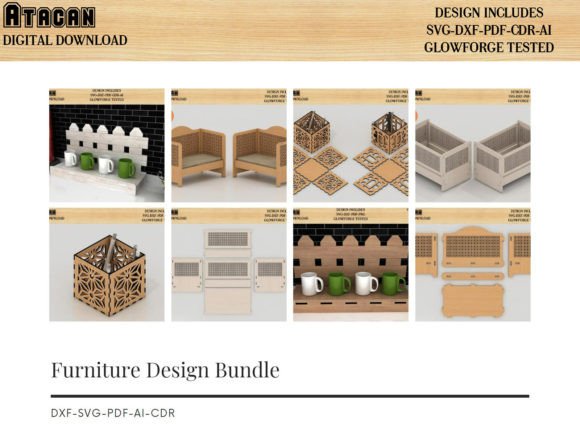
3D Doll House Miniature Furniture Bundle
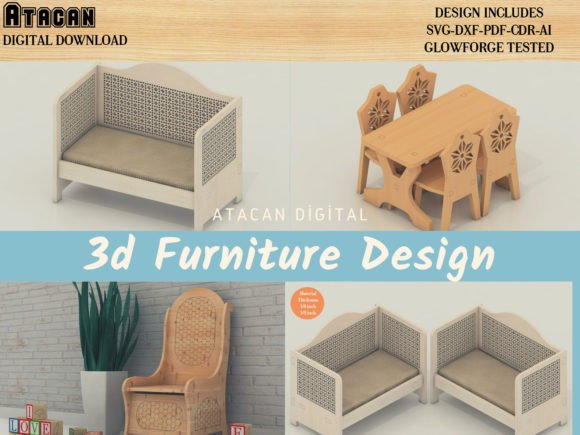
Creating intricate miniature furniture requires precision that is difficult to achieve by hand, especially when working at a 1:12 or 1:24 scale. The 3D Doll House Miniature Furniture Bundle addresses this challenge by providing pre-engineered vector files specifically designed for digital fabrication. Rather than spending hours drafting individual chair legs or cabinet sides in CAD software, makers can import ready-to-cut designs directly into their workspace. These files have been rigorously tested on a Glowforge Pro to ensure proper fit and assembly, yet they remain universally compatible with virtually all laser cutters and electronic paper cutting machines. This versatility allows creators to focus on finishing techniques, painting, and staging rather than the technical geometry of joinery.
Streamlining Production for Small Business Owners
For entrepreneurs selling miniature decor on platforms like Etsy or at craft fairs, time is the most valuable resource. Designing original 3D furniture from scratch involves a steep learning curve and significant trial-and-error waste. This bundle eliminates the prototyping phase entirely. Because the designs are optimized for laser cutting, business owners can move straight from file to production. The inclusion of multiple file formats—SVG, DXF, PDF, AI, and CDR—means you do not need to convert files or worry about compatibility issues between different design ecosystems. A shop owner using LightBurn can open the DXF files immediately, while an Adobe Illustrator user can edit the AI vectors without losing fidelity. This interoperability reduces friction in the workflow, allowing for faster inventory turnover and more consistent product quality across batches.
Precision Engineering for Laser Cutter Users
Laser cutting miniature parts presents unique challenges regarding kerf (the width of material removed by the laser) and slot tolerances. Files that are not calibrated for these variables often result in loose joints or pieces that require excessive force to assemble, leading to breakage. The 3D Doll House Miniature Furniture Bundle has been validated on a Glowforge Pro, serving as a reliable baseline for dimensional accuracy. While settings vary by machine wattage and material density, starting with tested files significantly reduces calibration time. Users with other laser systems, such as xTool, Omtech, or FLUX, will find these vectors provide a superior starting point compared to generic internet downloads. It is important to note that while the geometry is sound, operators should always run a test cut on scrap material to fine-tune power and speed settings for their specific setup, particularly when switching between 3mm plywood and acrylic.
Versatility Across Paper Crafting Platforms
Although engineered with laser precision in mind, these vector files offer substantial value to the paper crafting community. Machines like Cricut, Silhouette Cameo, Sizzix, Brother ScanNCut, and Gemini rely heavily on clean SVG and DXF paths for accurate blade tracking. Complex miniature furniture designs often contain tiny internal cutouts that can cause drag or tearing if the vector nodes are messy. This bundle provides clean, node-optimized paths suitable for cardstock, heavy paper, and thin chipboard. Educators and hobbyists creating architectural models or historical dioramas can utilize these files to produce detailed furnishings that would be impossible to cut cleanly with manual die-cutting tools. The ability to scale vectors without pixelation means a single file can serve dual purposes: creating sturdy wooden furniture for a collector’s dollhouse and delicate paper versions for a scrapbooking project.
Enhancing Creative Focus Through Technical Reliability
The primary benefit of acquiring a professional-grade asset library is the mental space it creates for artistic expression. When the structural integrity of a miniature table or wardrobe is guaranteed by the file design, the maker can dedicate energy to surface treatments. Instead of troubleshooting why a drawer won't slide, you can experiment with staining, aging, upholstery, and hardware installation. This shift from engineering to artistry is particularly beneficial for content creators and bloggers who need to produce visually compelling projects within tight deadlines. The JPG reference files included in the bundle serve as visual guides during assembly, reducing cognitive load and preventing errors. This documentation ensures that even complex multi-part assemblies come together intuitively, supporting a smoother creative process from digital file to physical object.
Understanding File Formats and Practical Application
Navigating digital assets requires understanding which format suits your specific hardware. This bundle covers the entire spectrum of vector standards to ensure no user is left behind:
- SVG (Scalable Vector Graphics): The industry standard for Cricut Design Space, Silhouette Studio, and most browser-based laser interfaces. It retains editability and scales infinitely.
- DXF (Drawing Exchange Format): Essential for older versions of Silhouette Studio (Basic Edition) and widely used in industrial laser software like RDWorks and LightBurn. It focuses purely on geometry without styling data.
- AI (Adobe Illustrator): Ideal for designers who wish to modify the furniture dimensions or add custom engravings before cutting. Maintains layer structure and editable paths.
- CDR (CorelDRAW): Preferred by many professional sign shops and laser engravers who use Corel as their primary driver interface.
- PDF: Useful for printing templates for hand-cutting verification or importing into various CAM software packages that accept PDF vectors.
- JPG: Strictly for reference. These raster images help visualize the final assembled product but cannot be cut directly.
Having access to this comprehensive suite prevents the common frustration of purchasing a design only to discover it lacks the specific format your machine requires. It also future-proofs your purchase; if you upgrade from a Cricut to a laser cutter later, your existing library remains fully usable.
Considerations for Material Selection and Assembly
While the 3D Doll House Miniature Furniture Bundle offers exceptional flexibility, successful outcomes depend on appropriate material choices. The slot-and-tab joints in these files are typically designed for specific thickness ranges, commonly 3mm (1/8 inch) basswood, birch plywood, or MDF. Using materials that deviate significantly from this specification may require resizing the slots in your vector software. For paper craft users, cardstock weight matters; 65lb to 80lb cover stock generally provides enough rigidity for structural furniture pieces, while lighter text weight paper is better suited for decorative accents. Additionally, dry-fitting parts before applying adhesive is strongly recommended. This practice identifies any tight tolerances caused by material variance and allows for light sanding or adjustment before permanent assembly. Understanding these practical limitations ensures the digital precision translates effectively into the physical realm.
Supporting Educational and Therapeutic Goals
Beyond commercial and hobbyist applications, these precise vector files serve valuable roles in education and therapy. STEM educators teaching scale, ratio, and geometric spatial reasoning can use the furniture components as tangible manipulatives. Students can measure the digital file, predict the physical dimensions, and verify their calculations against the laser-cut result. In therapeutic settings, the structured nature of assembling laser-cut miniatures supports fine motor skill development and cognitive sequencing. The predictable fit of tested files reduces frustration for individuals rebuilding dexterity or processing capabilities, providing a sense of accomplishment through manageable, step-by-step construction. The availability of reference JPGs further aids this process by offering clear visual targets without requiring advanced reading comprehension or technical drafting skills.