Integrating 3D Laser Paper Cut Butterfly SVG Files into Creative and Commercial Workflows
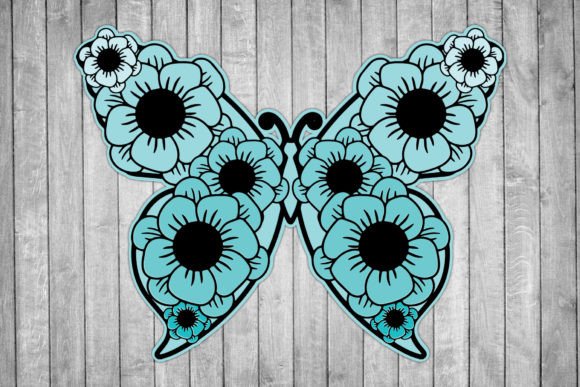
The transition from digital design to physical fabrication requires precise assets that bridge the gap between software and hardware. A 3D Laser Paper Cut Butterfly SVG serves as this critical link for makers, small business owners, and educators. Unlike standard two-dimensional vector art, these files are engineered specifically for layering, shadow depth, and structural integrity when cut from paper or cardstock. Understanding how to leverage this specific asset type transforms a simple download into a scalable production resource for greeting cards, shadow boxes, wedding invitations, and decorative wall art.
When you acquire a professional-grade 3D Laser Paper Cut Butterfly SVG, you are not merely downloading an image; you are obtaining a manufacturing blueprint. The utility of this asset extends across the entire project lifecycle, from initial prototyping to final mass production. Success depends less on artistic ability and more on technical preparation, file management, and understanding the interplay between digital vectors and physical material constraints.
Technical Specifications and Asset Management
Efficient workflow begins with understanding exactly what is delivered and how each format serves a distinct function in your production pipeline. Upon purchase, you receive a single ZIP file containing multiple formats. Organizing these immediately prevents bottlenecks later in the process.
- SVG: The primary working file for cutting machines like Cricut, Silhouette, and Glowforge. It retains editable nodes and layers essential for 3D assembly.
- PNG: A high-resolution raster preview useful for mockups, client approvals, and listing photos without needing to open vector software.
- AI: Adobe Illustrator source file for professionals requiring deep customization, node editing, or integration into larger branding suites.
- PDF: Universal vector format ideal for laser cutter bed sizing and print-shop compatibility.
- DXF: Exchange format ensuring compatibility with older CNC software, AutoCAD, and industrial laser systems that do not natively support SVG.
Because these are strictly digital files with no physical shipment, your local file organization system becomes your inventory management. Create a standardized folder structure separating source files, working files, and export-ready production files. This distinction is vital because you will frequently resize artwork based on project requirements. Always keep a master copy at its original resolution to prevent quality degradation during future scaling operations.
Pre-Production Planning and Material Compatibility
Before sending a 3D Laser Paper Cut Butterfly SVG to your machine, you must validate the design against your chosen substrate. Digital precision does not guarantee physical success if material variables are ignored. The "3D" aspect of this design relies entirely on the stacking of layers, meaning paper weight and thickness directly impact the final aesthetic.
During the planning phase, determine the paper GSM (grams per square meter). Lightweight paper may warp under laser heat or fail to hold the dimensional shape, while heavy cardstock might require adjusted blade depth or laser power settings. Use the included PNG file to visualize layer separation before wasting expensive materials. For laser users, test kerf (the width of material removed by the beam) on scrap pieces first. Intricate butterfly wing details can be lost if the kerf compensation isn't accounted for in the vector file, especially when resizing the artwork to smaller dimensions.
This stage also involves software interoperability. If you use LightBurn or RDWorks for laser cutting, import the DXF or PDF for optimal path recognition. For crafting plotters, the SVG is typically superior. Verify that all compound paths are closed and that layers are correctly grouped. A common workflow error is assuming the file is "cut-ready" without checking for stray nodes or overlapping lines that cause double-cuts and burnt edges.
Execution: Resizing and Machine Calibration
One of the primary advantages of this digital asset is the ability to easily resize the artwork to your required size. However, scaling 3D paper designs requires a different approach than scaling flat graphics. When you enlarge a butterfly design for a wall installation, line weights remain proportional, but structural rigidity changes. Conversely, shrinking the design for jewelry or miniature dioramas risks losing delicate vein details.
Implement a scaling protocol within your design software. When adjusting dimensions, lock the aspect ratio to maintain anatomical correctness. After resizing, inspect the smallest internal cuts. If they fall below your machine’s tolerance threshold (typically 0.5mm for paper), simplify those specific vectors rather than forcing the machine to attempt impossible detail. This practical adjustment saves time and reduces material waste.
For printing projects where the butterfly serves as a template or hybrid element, ensure your printer settings match the digital canvas size. The PDF and AI files allow you to add registration marks or color guides if you plan to print patterns onto the paper before cutting. This hybrid workflow—printing first, then cutting—is increasingly popular for creating multi-colored butterflies without manual painting. Aligning the digital cut file with the printed output requires precise calibration, making the vector accuracy of the provided SVG indispensable.
Post-Processing and Quality Control Integration
The workflow does not end when the machine stops. Post-processing is where the 3D effect is realized. Because this asset is designed for layering, establish an assembly station with appropriate adhesives. Foam tape creates consistent spacing, while liquid glue allows for variable depth. Reference the original digital file during assembly to ensure layer order matches the designer’s intent. The visual depth of a 3D Laser Paper Cut Butterfly SVG is calculated digitally; deviating from the intended stack sequence compromises the optical illusion.
Quality control should be systematic. Create a checklist based on the digital specifications: Are all wings symmetrical? Is the char residue within acceptable limits for the intended market? Does the resized version maintain structural integrity? Documenting these outcomes builds a knowledge base for future projects. If you are selling finished goods, photograph the result using the original PNG as a reference for consistency across product listings.
Commercial Considerations and Licensing Awareness
For entrepreneurs and freelancers, integrating this asset into a business model requires clear boundaries. Since downloaded products cannot be refunded due to their digital nature, the burden of verification lies with the user before purchase. Ensure the license covers your intended use case, whether personal, commercial, or extended commercial. Misunderstanding licensing is a workflow risk that can lead to legal issues or platform bans on marketplaces like Etsy.
Furthermore, recognize that efficiency comes from mastery, not just acquisition. Spend time learning the specific node structure of this butterfly SVG. Understanding how the designer constructed the 3D joints allows you to repair files if necessary or adapt the technique to other insect designs. This knowledge transfer turns a single purchase into a long-term skill set.
Finally, manage client expectations regarding digital versus physical deliverables. If you offer custom services using this 3D Laser Paper Cut Butterfly SVG, clearly communicate that proofs are digital representations. Use the high-quality PNG and PDF exports to create accurate mockups that set realistic expectations for texture, shadow, and scale. This transparency reduces revision cycles and protects your profit margins.
Long-Term Asset Utilization
Sustainable creative workflows rely on reusable assets. A well-organized 3D Laser Paper Cut Butterfly SVG library becomes more valuable over time. Tag files by style, complexity, layer count, and tested material compatibility. When a new seasonal project arises, you can quickly retrieve and adapt existing assets rather than starting from scratch.
Consider how this asset interacts with other resources in your ecosystem. Can the butterfly wings be separated and used as standalone confetti? Can the body be modified to fit a different theme? The AI and SVG formats provide the flexibility to deconstruct and recombine elements. This modular approach maximizes the return on investment for digital assets.
Ultimately, the value of a 3D Laser Paper Cut Butterfly SVG lies in its successful translation from screen to reality. By treating the download as a technical component within a broader manufacturing or creative process, you move beyond simple crafting into efficient, reproducible production. Whether for personal enrichment or commercial enterprise, the discipline applied to file management, material testing, and execution determines the quality of the final outcome. The digital file provides the potential; your workflow realizes it.